Pick and run a program
A program is a multi-week plan with every session laid out for you. Use one when you want structure instead of deciding each day.
Video, 22 seconds, with narration and captions. Build, then Start a Program. The rest are marked Pro. 4x2 at 63% shows as 79 kg.
Start a program
Section titled “Start a program”- Tap the Build button, then Start a Program.
- Browse the list. Each card shows the number of weeks and the type of training.
- Open one to preview its weeks and days.
- Tap Start This Program, then Start Today. The program begins today. If you already have a program running, the app asks before it abandons that one, and the sessions you finished stay in your Log Book.
Beginner Foundation is free. Every other program is Pro, including the Classic Systems below. To write your own, see Write your own program.
Classic systems (Pro)
Section titled “Classic systems (Pro)”Below the Program Library, Classic Systems holds four programs built on the principles of well-known national training traditions:
- Bulgarian-Style High Frequency: 6 weeks, 5 days. The classic lifts and squats, worked up to a heavy single by feel each day, then back-off singles.
- Soviet-Era Multi-Lift: 8 weeks, 4 days. A wide range of variations and pulls, in two waves with an easier week between.
- Chinese-Style Volume and Strength: 8 weeks, 5 days. High squat and pull volume, with upper back and posterior chain work every day.
- Russian-Style Squat Cycle: 6 weeks, 3 days. A squat block that ends in a test single, with light technique work to keep the lifts sharp.
Open one to see its tradition card, such as The Bulgarian Tradition: the principles it is built on and how it was adapted. The sets and percentages are the app’s own, not a copy of any team’s plan, and each is scaled to one session a day, since the originals were written for full-time athletes training more than once a day.
On a daily-heavy-single day, the back-off sets are a percentage of the top single you actually made, so their weight appears once you log it.
Without Pro you can still open a Pro program and read its first week. Unlock with Pro at the bottom takes you to the upgrade.
How sessions are made
Section titled “How sessions are made”You do not build the sessions. Each day in the program lists its exercises, sets and reps, and most weights are a percentage of your record for that lift. When you start a day, the app turns those percentages into real weights using your current records, so the loads follow your progress.
Open today’s session from the Train tab and it runs in the same live screen as any other workout.
Pause, end or restart
Section titled “Pause, end or restart”On the Programs list and on the running program’s own page you can End Program or Restart from Week 1. Both ask you to confirm. Ending only stops the remaining schedule. Sessions you already finished stay in your Log Book.
Skipping and missed days
Section titled “Skipping and missed days”If a scheduled day passes without a session, the app asks what to do about it:
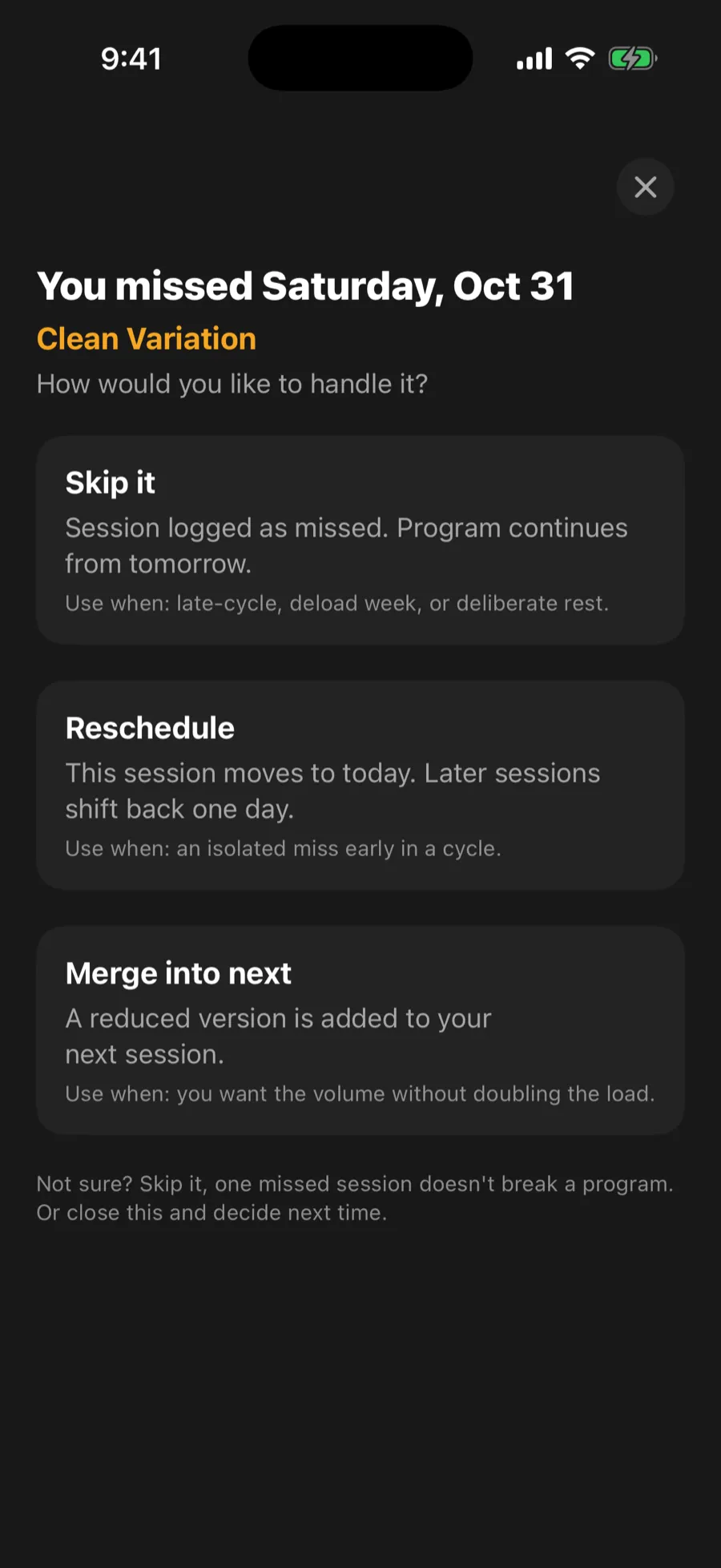
- Skip it: logged as missed, and the program continues from tomorrow. Good late in a cycle, in a deload week, or when you chose to rest.
- Reschedule: the session moves to today and later sessions shift back a day. Good for a single miss early on.
- Merge into next: a reduced version is added to your next session, so you keep some of the volume without doubling the load.
If you missed several days, you get one question about the most recent one. The older days are logged as missed once you choose. If you close it without choosing, nothing changes and it asks again next time.