Build a workout around how you feel
The workout builder is for days when you are not following a program. You answer a few questions about how you feel, the app drafts a session, and you change anything you like before you start.
Video, 34 seconds, with narration and captions. Energy, sore muscles and time. Sore muscles avoided. Sets and time shown. Light, Normal or Heavy. One set at a time. No program needed.
Start a workout
Section titled “Start a workout”- Tap the Build button (the plus in the middle of the tab bar).
- Tap Build My Workout.
- Fill in the check-in: your energy, which muscles are sore, which blocks you want to train, and optionally how much time you have. Sore muscles are filled in from your recent training, so just adjust them.
- Tap Load It Up.
If you leave the blocks blank, the app chooses the shape of the session. If you tick blocks, such as Clean & Jerk and Squats, you get exactly those and nothing bolted on. Your choice is remembered for next time.
The “Training at” row lets you pick which gym you are in, so the bar, plates and equipment match what you actually have.
Read the draft
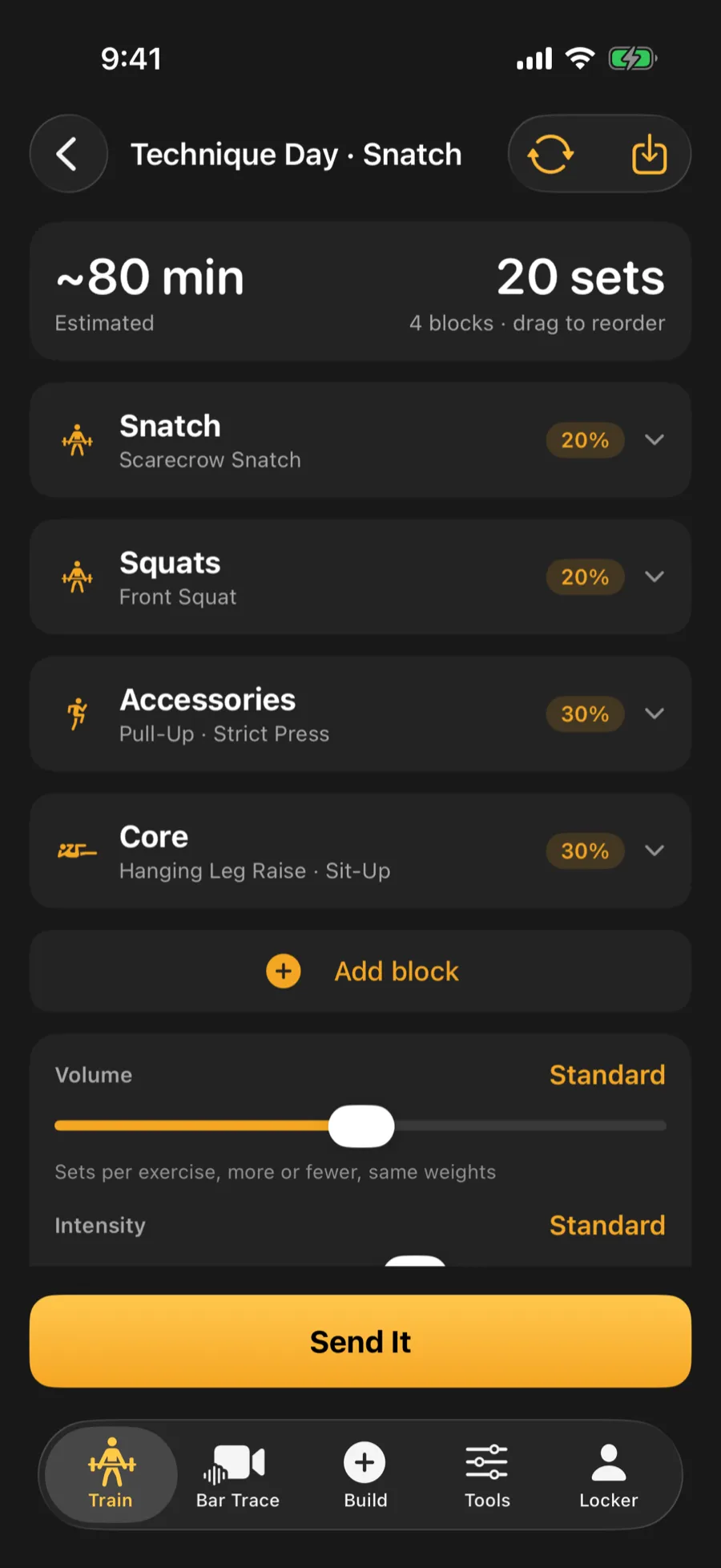
Section titled “Read the draft”The draft shows an estimated time, the total working sets and a list of blocks. A block is one part of the session, such as a lift, squats or accessories. Drag blocks to reorder them.
Cards on this screen explain the draft: what the app adjusted from your history, which weak point a choice addresses, and a “How this session was built” note that says why you are snatching today and what the time limit trimmed.
Change exercises
Section titled “Change exercises”- Swap: tap Swap on an exercise, and the list is limited to the equipment you have.
- Add exercise: use Add exercise at the foot of a block.
- Remove a block: use Remove block.
- Add block: use Add block to bring in a whole new part of the session.
Edit sets and weights
Section titled “Edit sets and weights”Each exercise has steppers for sets and reps. Percentage work shows a percent of your record for that lift, and effort-based work shows a target effort rating (RPE, a 1-10 scale of how hard a set feels).
Each loaded exercise also has a Pyramid switch. When it is on, the sets climb or descend like a ladder instead of repeating one weight. Low-rep work such as doubles and singles holds its reps and ramps the weight.
Sliders for volume and intensity scale the whole session.
Reshuffle
Section titled “Reshuffle”Not keen on the draft? Tap Reshuffle for a different set of movements.
Tap Send It to begin. The workout opens in the live session screen, where you log each set.
Video, 12 seconds, no sound: tap Build, choose Build My Workout, answer the check-in and tap Load It Up. The draft opens with its blocks, ready to adjust.